Categories
ai cloud

Amazon Bedrock Knowledge Base: a first look

Amazon Bedrock is a fully managed service designed to simplify the development of generative AI applications – as opposed to Amazon SageMaker which provides services for machine learning applications. It offers access to a growing collection of foundation models from leading AI companies such as AI21 Labs, Anthropic, Cohere, Meta, Mistral AI, Stability AI, and Amazon itself.

One of the latest offering under Amazon Bedrock is Amazon Bedrock Knowledge Base – which I shall refer to as ABKB. Essentially, ABKB is a simple way to do retrieval augmented generation (RAG). RAG is a technique to overcome some of the problems with foundation models (FM), such as not having up-to-date information and lack of knowledge of organization’s own data. Instead of retraining or fine tuning a FM with your own data, RAG allows existing FM to reference those data when responding to a query to improve accuracy and minimize hallucinations. In this article, I will go through the process of setting up ABKB and see how it can be used it in a sample application. But first, let’s look at the 2 ways you can use ABKB in a RAG application:
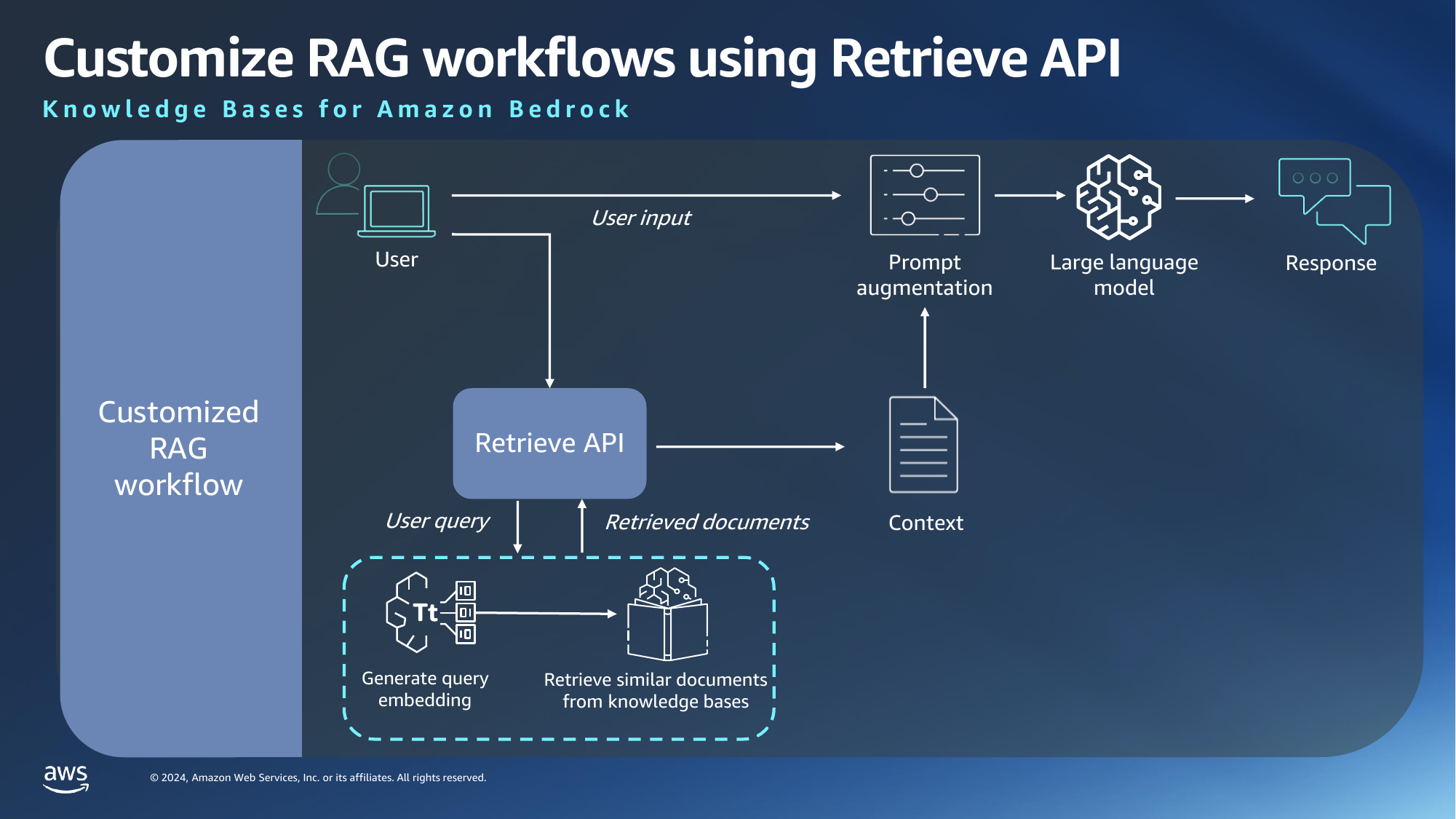
Custom RAG workflow is useful for cases where you want to have more control over the prompt augmentation process, or where you want to use FM which are not available in AWS. Here, you are only using AWS to generate embeddings – which is a technique to convert words into a numerical form – and to retrieve similar documents from user prompts.
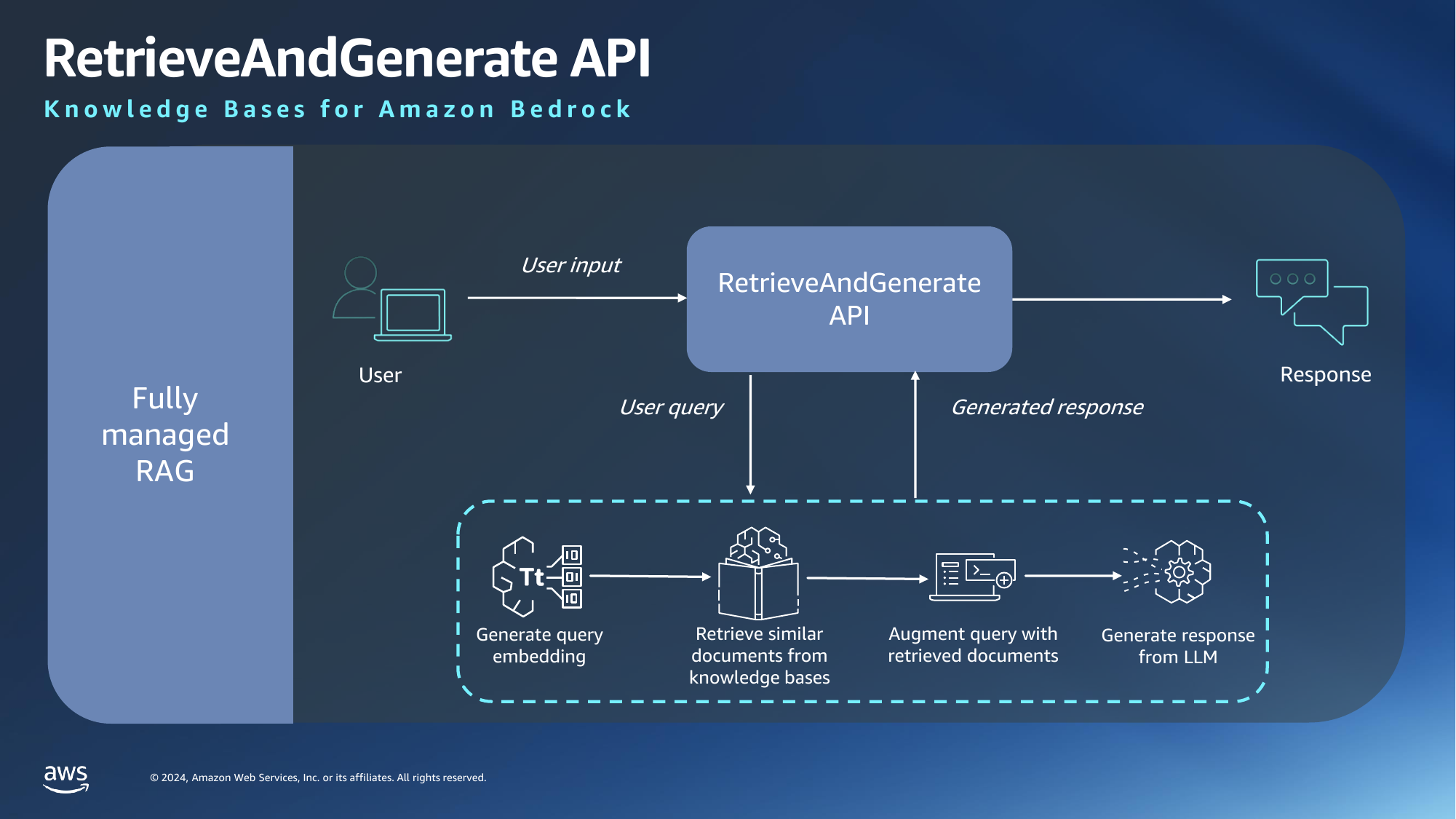
In a fully managed RAG workflow, we will use AWS for all stages of the pipeline and this is what we will be doing.

Things to take note

As it is with new services, Amazon Bedrock is currently available only in limited regions. We will be using the US East (N. Virginia) region.

Note that you will need to login as an IAM user, not root user, to use ABKB. Suffice to say the IAM user will need to have sufficient permissions.

Request model access

Before you can use any Bedrock services, you will need to request for permission to the models that you want to use. This is done under the Model access option on the left panel.
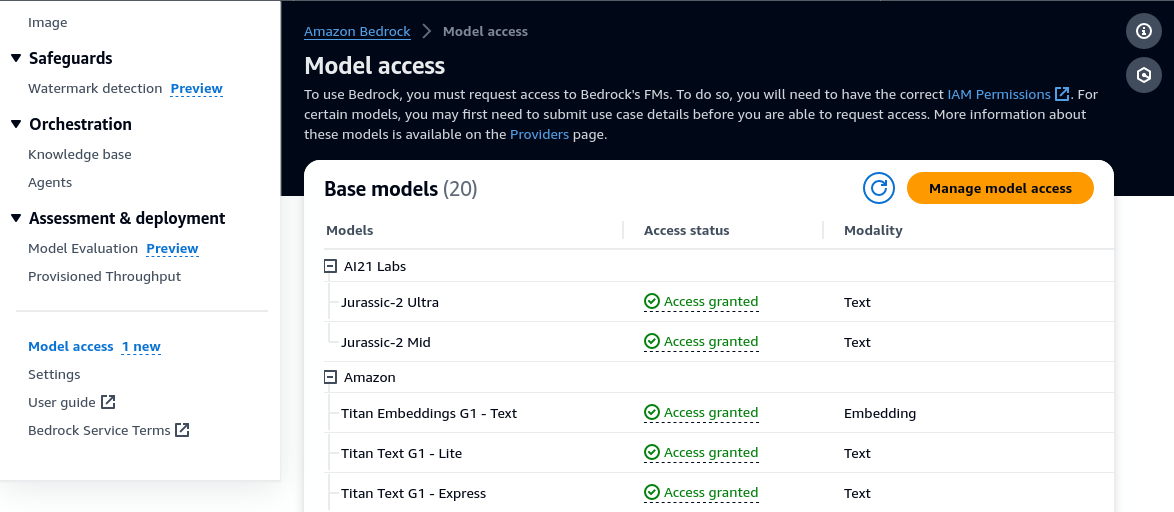
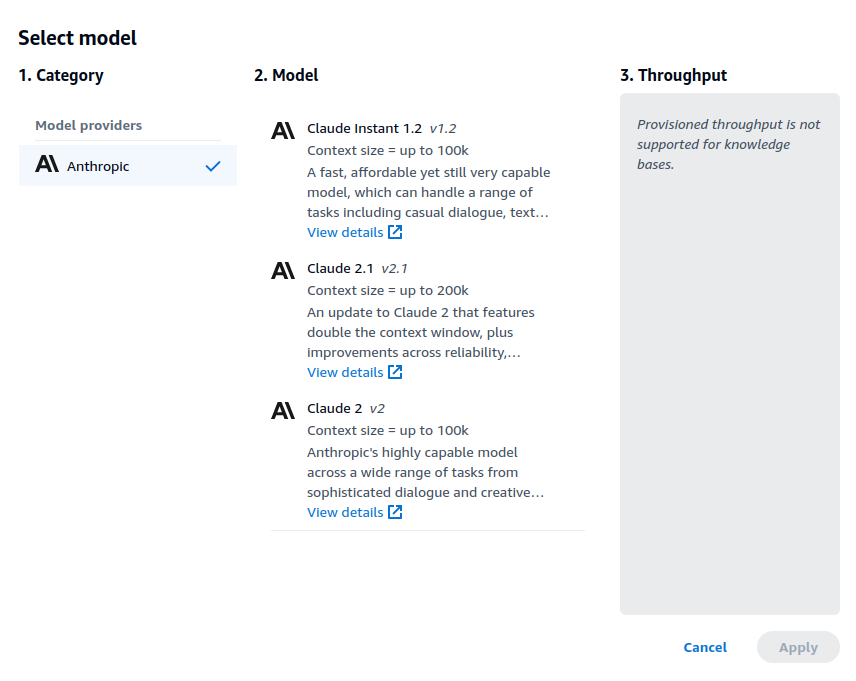
There is no cost to request for model access so you might as well request for everything. The main reason for this step is to make sure you agree to the EULA for each model which will be different for different providers. Access to most models are automatically granted after request, except for Anthropic models, which you will need to provide a use case. You will need to do this because ABKB only supports Anthropic models at this point for its retrieve and generate API.

Create data source

ABKB takes data from a S3 bucket as its data source, so you will need to use or create a S3 bucket. Use the same region as the knowledge base if you are creating a new bucket.

There are some limitations to the size and type of documents supported. Mainly, documents should not exceed 50MB in size and it will only process text in supported documents (txt, md, html, doc, csv, xls, pdf).

Create knowledge base

There are 4 steps to create a knowledge base. Step 1 is straightforward and just involves filling in the name, description and IAM permissions – which you can leave as default.

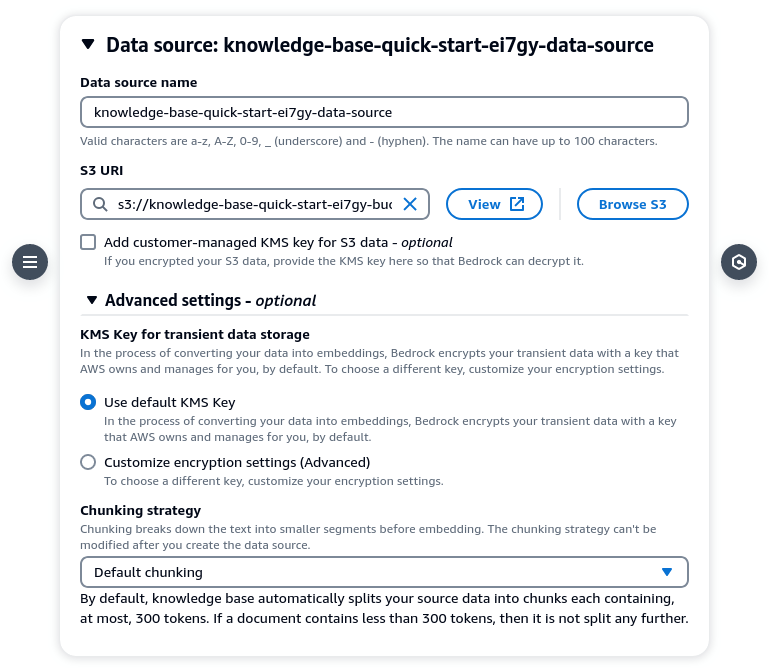
In Step 2, you will need to specify the data source. By right you should be able to click on [Browse S3] and choose your bucket but it was not working for me. So enter the S3 URI manually if you need to. For chunking strategy you can leave it as default (300 tokens) or customize it according to your needs.
In Step 3, choose your embeddings model and vector database. You can choose between Amazon Titan or Cohere’s model for embedding. There are some articles that says Cohere’s models are superior. You can choose either and evaluate the performance. For vector database you can select Amazon OpenSearch Serverless, Aurora, Pinecone or Redis Enterprise Cloud. For development and testing, OpenSearch Serverless provides the cheapest option.
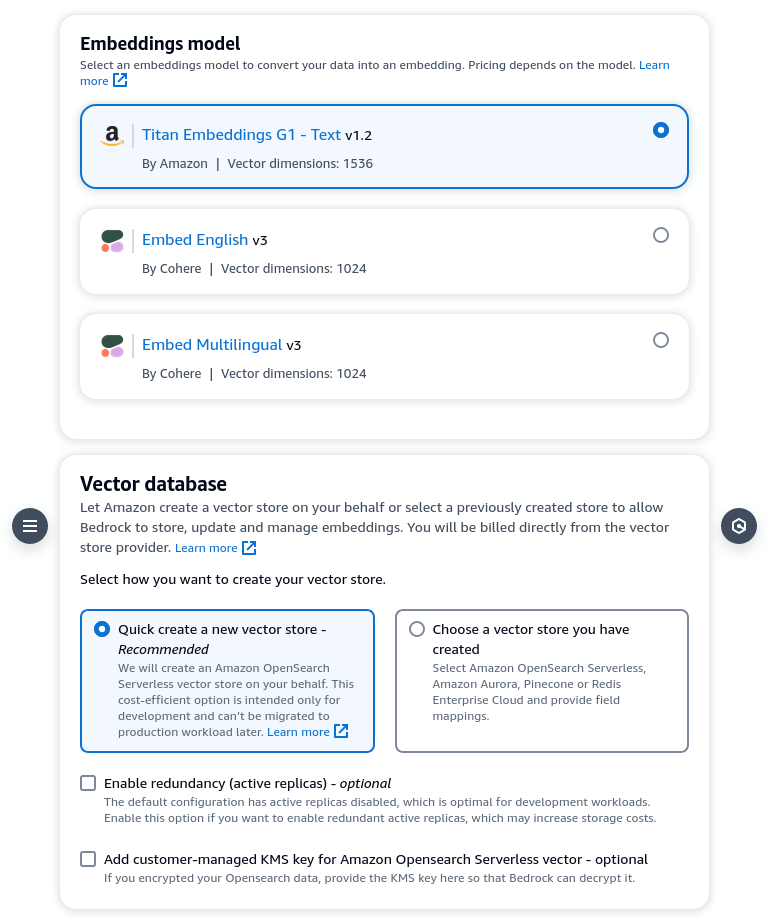
Step 4 is basically just a confirmation step. Click [Create knowledge base] to confirm. Note that it will take some time to provision the necessary resources after you click. While that is happening, do not close your browser tab. This is quite unusual as provisioning usually takes place in the background and there should not be a need to keep the frontend open, but that is not the case here.

Assuming all goes well, you will see a message to say that the knowledge base has been created successfully. You might have to wait a few more minutes for the vector database to fully index contents from the data source.

Test knowledge base

Now comes the fun part. you can now select your knowledge base and test it in the playground. You can configure the search strategy and model under configuration. Depending on your use case you might want to change the search strategy.
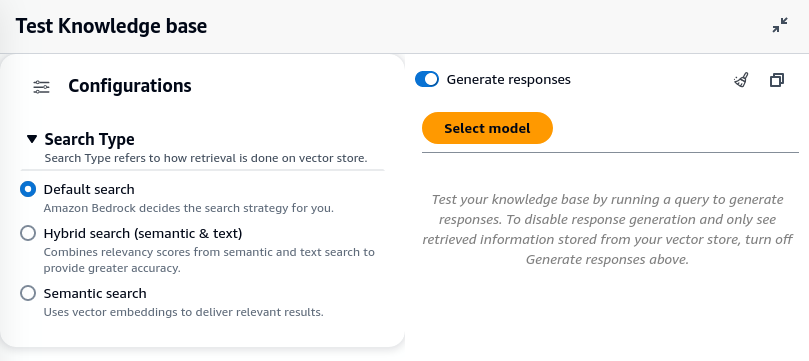
For model selection, Claude Instant provides the fastest response, but it does not perform as well for complex queries. I find almost no difference in Claude 2 and 2.1, but that is probably because my queries do not require a larger context window.
Sample responses

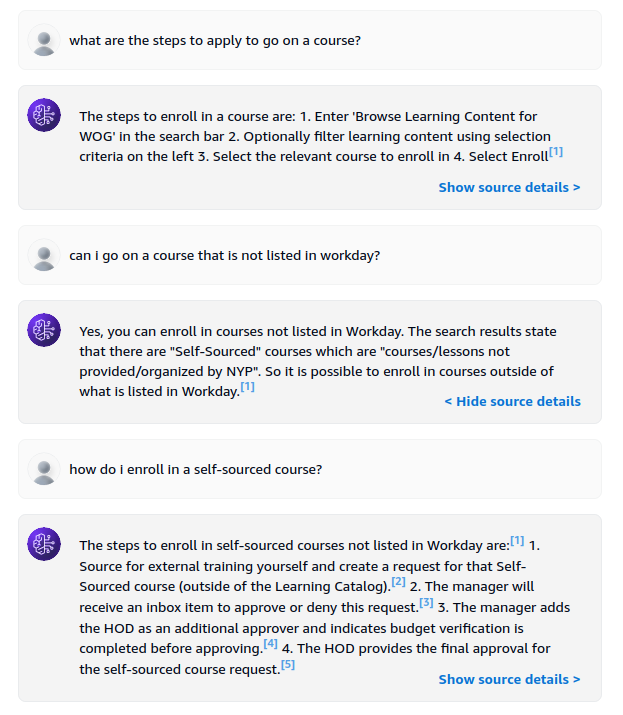
To test ABKB, I uploaded a 238 page employee user guide and use it to ask questions. The first one is a simple question.
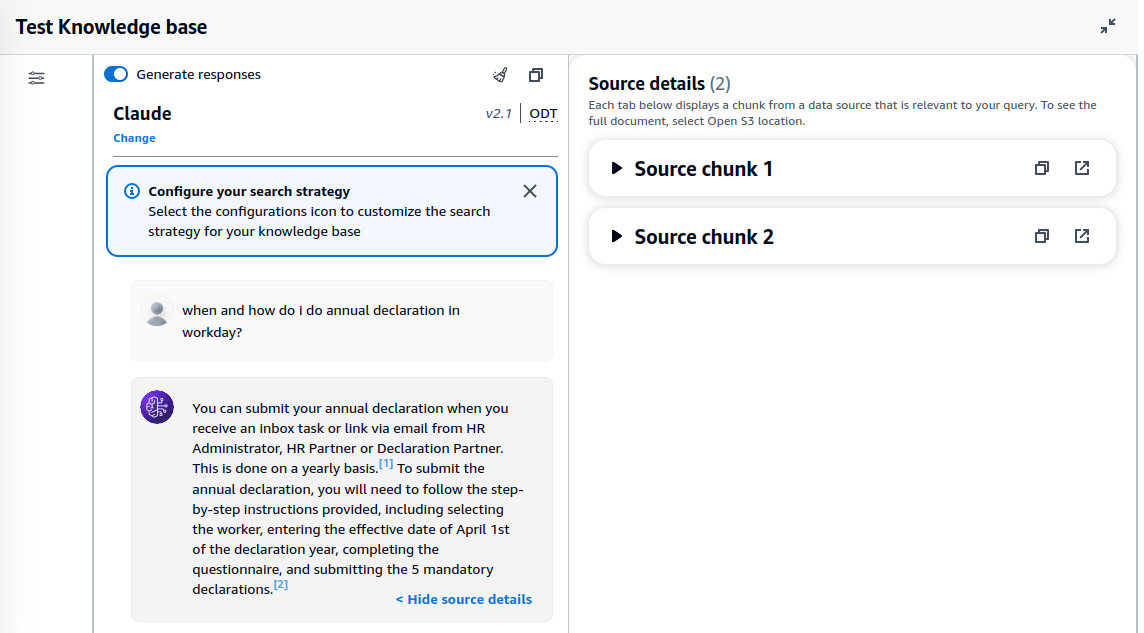
Note that the response includes references to source chunks, which are relevant text that are extracted from the data source. You can also expand source chunk to see the actual text.

The second example is one where I asked follow-up questions.
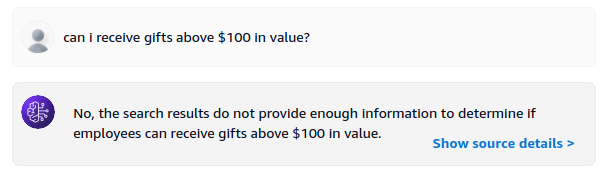
I also tried to ask it something which is not in the document. To which it responded correctly that there is no such information.
Conclusion

Amazon Bedrock Knowledge Base provides an opinionated way to do RAG in a straightforward manner. The knowledge base you create is meant to be integrated into applications via AWS SDK. As it is fairly new at this stage, some rough edges are to be expected. Some of the issues encountered so far includes:

  • Model request UI not straightforward
  • Browse S3 not listing buckets unless they are already a data source
  • Provisioning requires staying on the page
  • Only Anthropic models available for response generation
  • New models like Anthropic Claude 3 not available Anthropic Claude 3 models are now available
  • Failure to create knowledge base happens sometimes

Despite the teething issues, ABKB seems like a useful service for organizations to create RAG applications easily within the AWS ecosystem and I am excited to see the addition of more features to enhance its functionality in the upcoming weeks/months.
Categories
cloud programming sysadmin

How I reduced a WordPress database size by 85% and memory consumption by 20x

I was helping a friend to troubleshoot their e-commerce site. It was running on WordPress using WooCommerce as the e-commerce backend. Like most WordPress sites, it was installed with a ton of plugins. My friend complained that the site performance has been getting slower and slower, to the point where a page load can take anywhere from 2-3 seconds to a failing to load at all. Getting to wp-admin also took forever.

At first, there are a lot of pieces to unravel, since the cause might be anything. The backend was running on AWS. The WordPress site is running as a docker container on the EC2, while the database is running on a RDS instance. It uses Cloudflare tunnel to connect the public hostname to the docker container. Seems like a decent setup.

While I do use WordPress (this site runs on WordPress), I am not a WordPress developer so I was not familiar with where things might go wrong. My first intuition was to check the plugins, since not all WordPress plugins are well written and some are notorious for taking up a lot of resources. Unfortunately isolating plugin resource usage by instrumentation was not possible as far as I know, due to the way WordPress/PHP works. After comparing the set of plugins with another site which did not exhibit the same behaviour, I decided to try other approaches.

I tried the usual tricks, like enabling proxying in Cloudflare, using a caching plugin, upping the EC2 instance size and RDS instance size. I even added a robot.txt to prevent bots from crawling the site for the time being. Those tricks helped a little, but did not resolve the problem.

Using docker stats, I noticed that CPU and memory usage is extremely high for the container, compared to others. CPU consumption is often >100% with every page load and memory usage spiked to 14GB after a while. Another unusual sign is the size of the database. For a site with around 500 products, the database size is >600MB.

That is when I chanced upon this article when searching for the symptoms.

The problem WordPress sites can run into is when there is a large amount of autoloaded data in the wp_options table.

…

If you return anything below 1 MB you shouldn’t be worried. However, if the result was much larger, continue on with this tutorial.

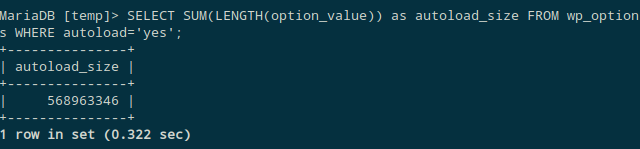
I ran the query in the article and it returned the following.

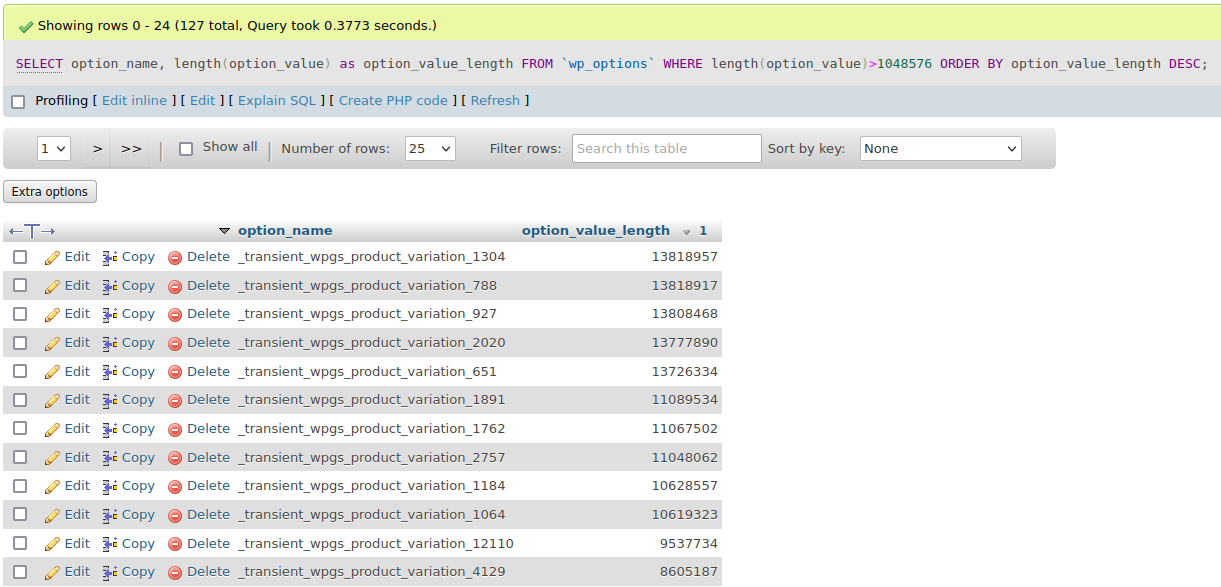
Wait. The autoload_size is ~570MB (!). I wrote a SQL command to find all the options which are larger than 1MB.

The results range from 1MB all the way to 13MB.

For the uninitiated, wp_options is akin to Windows registry, and it has become a dumping ground for plugins to store values that they might need. Most of the values in this option should be configuration values (like siteurl) which should take up just a few bytes. wp_option also has a field “autoload” which states whether the option should be loaded on every page. Storing 13MB in an option value and setting it to autoload is just insane. The total size of autoload options in the table turns out to be >500MB. Every page load is querying >500MB of data from the database and processing those data. No wonder the site is crawling!

Inspecting those options shows them most of them have the prefix _transient, which means they can be safely deleted. After making a backup of the database, I deleted all transient options. wp_options went from 556MB to 46MB, a reduction of >90%. The total database size went from 645MB to 84MB, a reduction of >85%. Memory consumption also dropped by 20x (from ~14GB to ~700MB). More importantly, the site is now super fast which is extremely important for an e-commerce site.

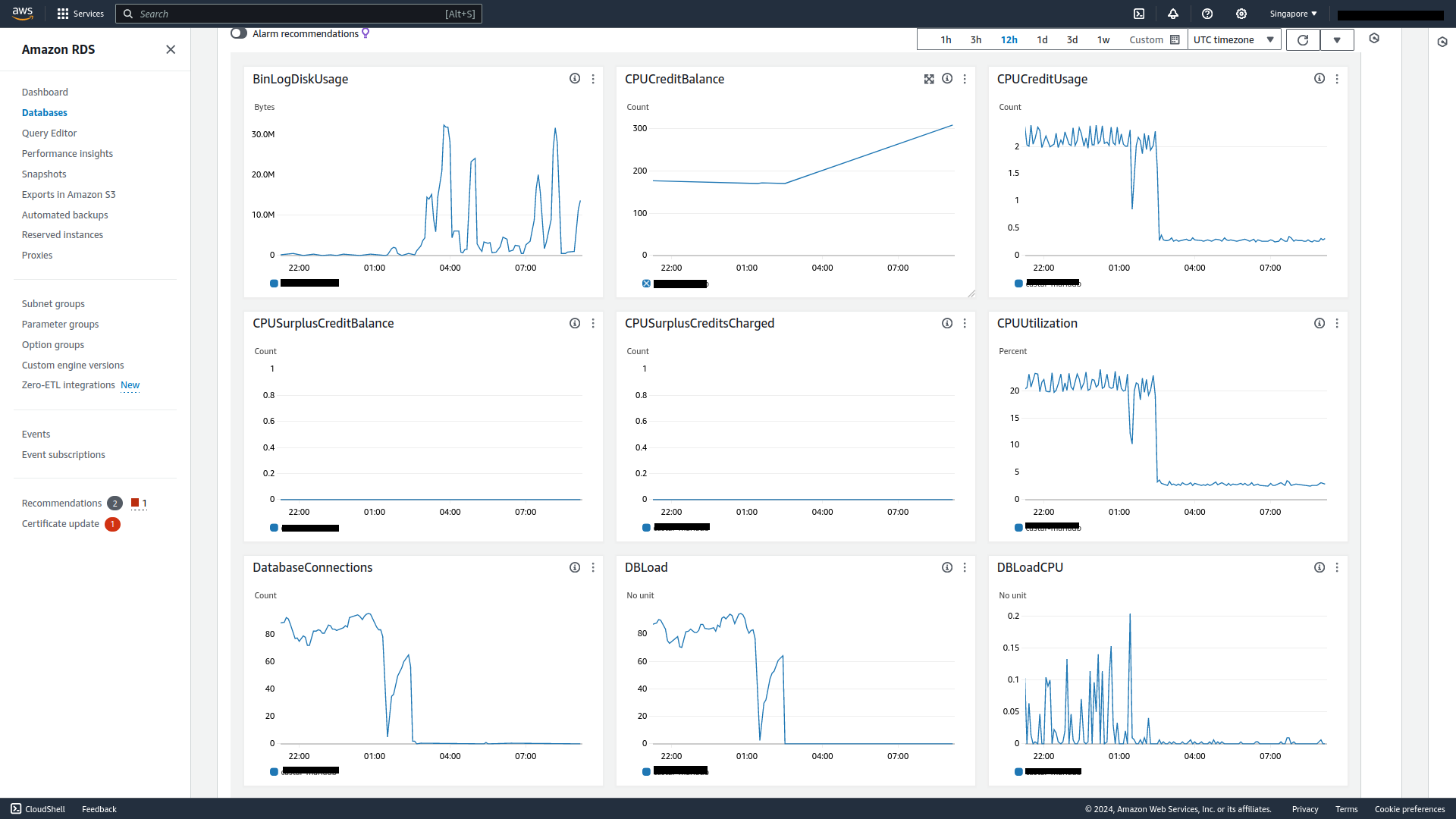
The results are very telling from the RDS dashboard.

Average CPU utilization has dropped to <3% and average database connections is now near zero.

Aside from noticeable performance boost for the site – average page loads within 1s – another bonus from these optimizations is that we can now use smaller EC2 and RDS instance types for better cost savings. Hopefully this article is useful as a reference for others in similar situations.

Categories
cloud

Slashing Data Transfer Costs in AWS by 99%

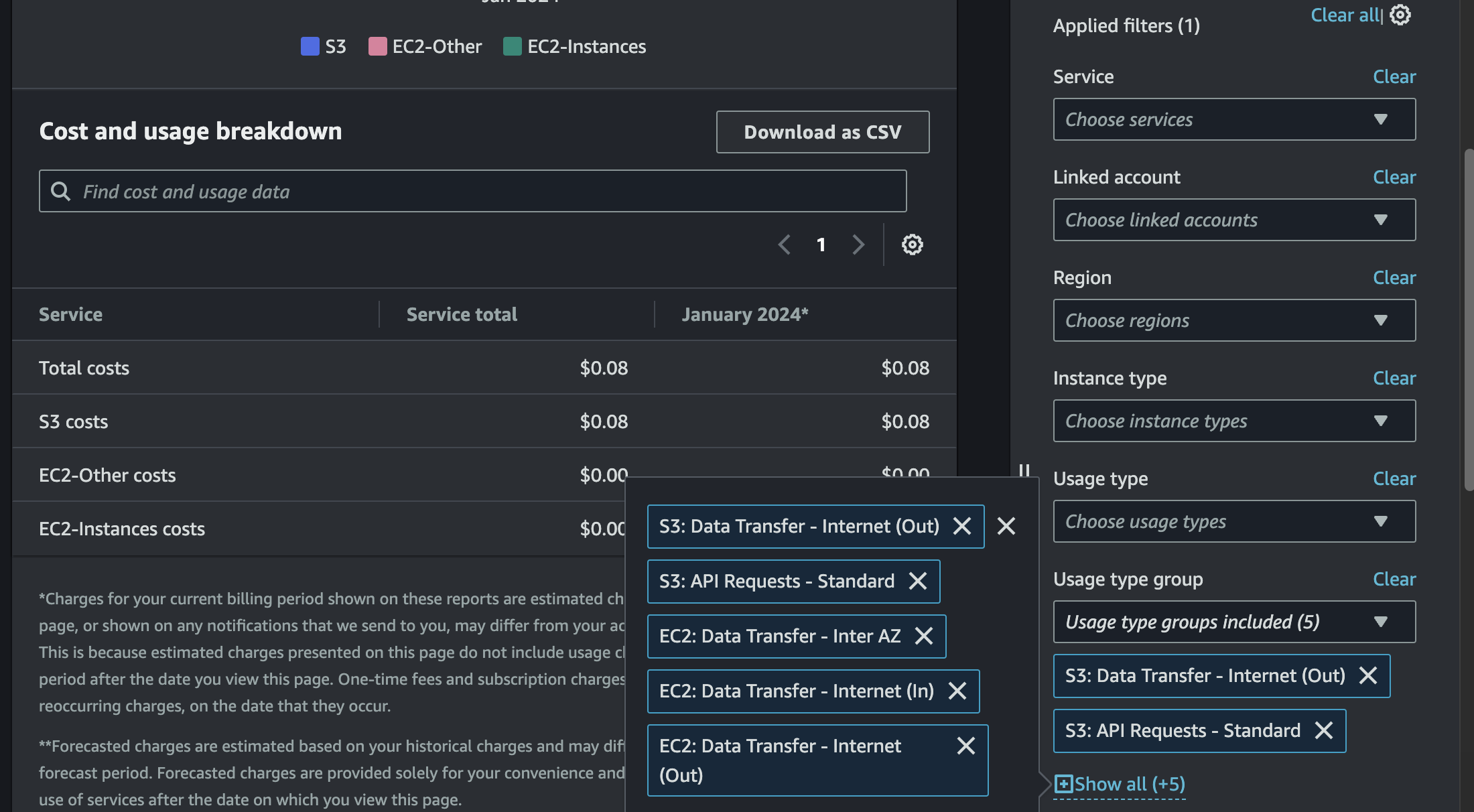
Everyone knows how egress (outgoing traffic) is not free in AWS. This is a “hack” to save on egress cost when transferring traffic between AWS regions. And yes, you can achieve savings of 99% when using this method.

There are lots of ways to accidentally spend too much money on AWS, and one of the easiest ways is by carelessly transferring data. As of writing, AWS charges the following rates for data transfer: Data transfer from AWS to the public Internet ranges from $0.09/GB in us-east-1 (N. Virginia) to $0.154/GB in af-south-1 (Cape Town). Therefore a single terabyte of data transfer will run you a cool $90 – $154.

Source: Slashing Data Transfer Costs in AWS by 99%

Categories
cloud

Announcing Amazon Managed Service for Apache Flink Renamed from Amazon Kinesis Data Analytics | AWS News Blog

It seems like AWS is renaming some of their services to refer to the underlying open-source software by name. This makes sense when AWS is just running the underlying software for the customer without too much changes, like Amazon Managed Grafana, Amazon Managed Streaming for Apache Kafka.

https://aws.amazon.com/blogs/aws/announcing-amazon-managed-service-for-apache-flink-renamed-from-amazon-kinesis-data-analytics/

Today we are announcing the rename of Amazon Kinesis Data Analytics to Amazon Managed Service for Apache Flink, a fully managed and serverless service for you to build and run real-time streaming applications using Apache Flink.

Categories
cloud

“Amazon accounts”

As a long time Amazon and AWS user, I have accumulated more than a few Amazon-related accounts. Recently I also had to work with other colleagues who are not so familiar with the Amazon services and accounts ecosystem. Here is an attempt to make sense of it all:

 AmazonAWSAPNSSOAdhoc
RetailAmazon.com
Amazon Prime
Y
CloudAWS ConsoleY
EducationAWS AcademyY
TrainingAWS Training and CertificationYYY
TrainingSkill BuilderYYY
EventAWS JAMYYY
Mapping of services to accounts

Hopefully it helps someone who’s figuring out which account to login to which service.

Categories
cloud programming

Web Push for Web Apps on iOS and iPadOS | WebKit

This is good news as it further expands the capabilities of web apps. This addresses a longstanding request for web apps to deliver notifications. Note that web push only works if the web app is added to Home Screen. It is to limit web apps that aggressively ask for too many permissions.

With iOS and iPadOS 16.4 beta 1 comes support for Web Push for Home Screen web apps, Badging API, Manifest ID, and more.

Source: Web Push for Web Apps on iOS and iPadOS | WebKit

Categories
cloud sysadmin

New – Visualize Your VPC Resources from Amazon VPC Creation Experience | AWS News Blog

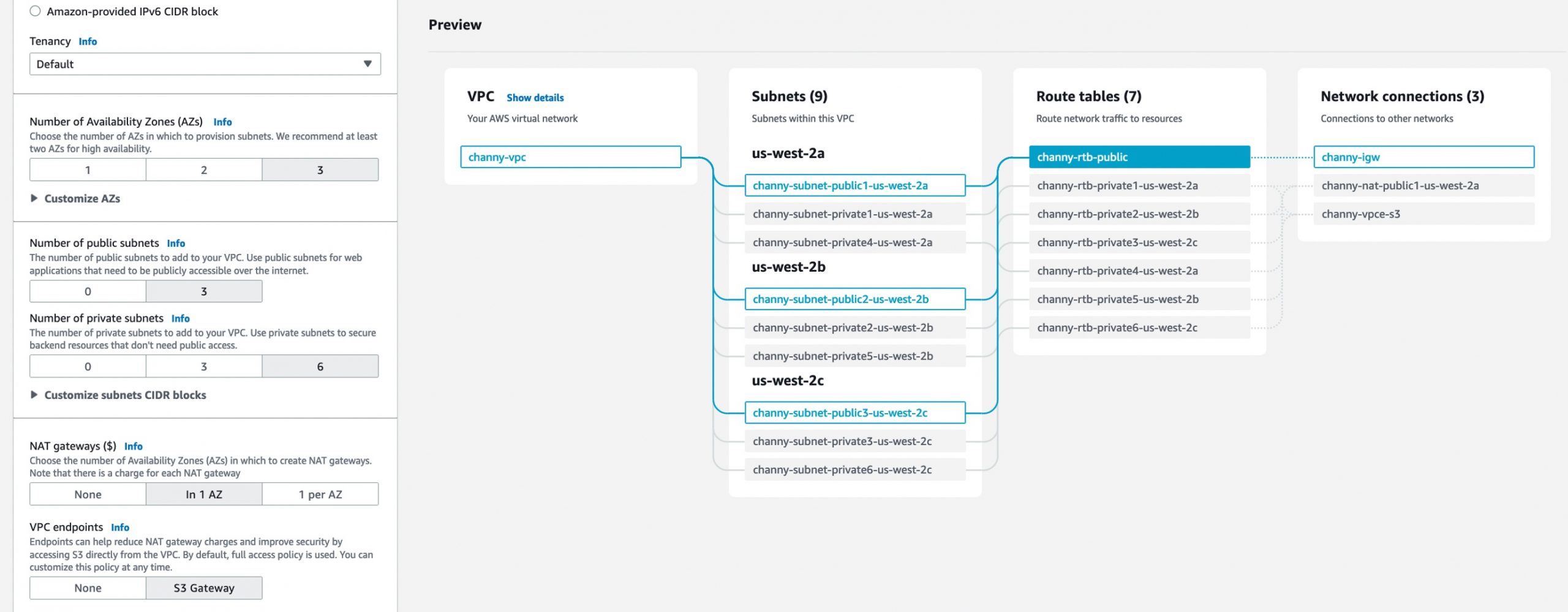
Finally. Amazon Web Services has released a new feature called Amazon Virtual Private Cloud (VPC) resource map, which simplifies the VPC creation experience in the AWS sonsole. This feature displays existing VPC resources and their routing visually on a single page, allowing users to quickly understand the architectural layout of the VPC.

The new VPC creation experience streamlines the process of creating and connecting VPC resources with just one click, even across multiple Availability Zones (AZs). The VPC resource map also allows users to quickly understand the architectural layout of the VPC, including the number of subnets, which subnets are associated with the public route table, and which route tables have routes to the NAT Gateway. Additionally, users can customize a Name tag per resource in the preview and easily change the default CIDR value and subnet mask. The Amazon VPC resource map is now available in all AWS Regions where Amazon VPC is available.

Categories
cloud network security

Tailscale

When I first know about Tailscale, I didn’t “get” it. I read that it is like VPN but not quite the same as your traditional VPN, but I don’t know the details. But since there are a lot of rave reviews from HN users I got curious. After trying it out, I am immediately sold. I have now installed it on all my personal devices.

Tailscale is a revolutionary new way of connecting devices together. Once setup – and it’s very easy to set up – your devices behave just like they are on the same network. No complicated VPN to setup, or persistent connection issues, or remembering IP addresses to access your devices. It just works.

Tailscale is akin to VPN what Dropbox is to file synchronizing.

Tailscale offers a wide range of benefits for businesses and individuals alike. One of the key benefits of Tailscale is that it allows users to access their networks and devices without the need for traditional VPN software. This means that users can access their networks and devices from any device, including smartphones, tablets, and laptops, without the need for additional software or configuration. This makes it extremely convenient for users who need to access their networks and devices while on the go.

Another benefit of Tailscale is that it offers top-of-the-line security. Tailscale uses state-of-the-art encryption to ensure that all data transmitted over the network is secure and protected from cyber threats. This makes it ideal for businesses and organizations that handle sensitive data and need to ensure that it is protected at all times.

The best part is Tailscale is extremely easy to use. It has a simple and intuitive user interface that makes it easy for users of all skill levels to set up and use.

I highly recommend trying it out to just to see how it works. Tailscale is free for personal use.

Categories
ai cloud

Amazon Polly speaks Cantonese

By now, text to speech systems are quite common and widely in use. Tiktok has this feature added as part of their app some time ago. Amazon Polly – Amazon’s version of text-to-speech service – was launched in 2016 and supports quite a large number of languages.

Just this week, AWS announced the availability of a female Cantonese voice to Polly. Upon reading about this, I have to test it out. For the test, I took a sample text from YES 933 facebook page and fed it to Polly. I must say I’m very impressed with the results.

Of course, Amazon Polly is not the first or only Cantonese text-to-speech service out there, but it’s definitely one of the most natural sounding one I’ve heard. Looking forward for more languages to be support.

Footnote: there are some minor modifications to the text to achieve the desired result, eg. to get pauses in the right places, to say nine-three-three instead of nine hundred thirty three etc. But otherwise only default settings are used.

Categories
cloud internet

Comparison of AWS Compute Options in 2022

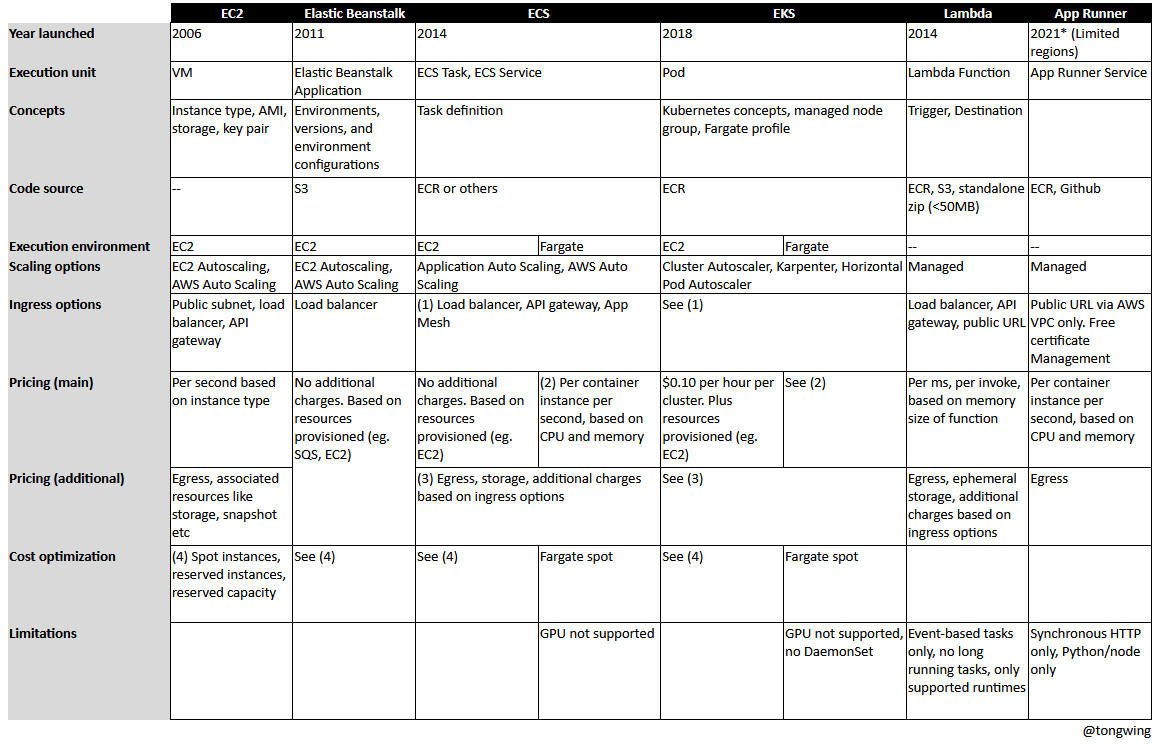
This is a non-exhaustive comparison of the popular AWS compute options. Hopefully it will help someone who’s also evaluating the various options for running your workload in AWS.

EC2 is the oldest and the most popular option as it is the easiest to start with. However you do have to manage a lot of things if you are choosing this option (OS, scaling, HA, etc). As a developer who may not be so familiar with cloud architecture, this can be daunting. Over the years, AWS has been making it easier to deploy code and make it scale. The latest compute product App Runner is a super simple way to write web applications in AWS. Though there are some who reported teething issues using it, I have no doubt those will be fixed in due time when it hits general availability.

Reference:
https://nathanpeck.com/concurrency-compared-lambda-fargate-app-runner/