AWS appears to be taking a fresh look at how to get developers started. Its documentation now describes a new sign-up experience called Sign up for AWS (new) – which I’ll simply refer to as AWS (new) in this post.
Over the last 20 years, AWS has gained a lot of capabilities (over 200+ products as of today), and a fair amount of complexity along with them. That flexibility is useful when you know what you are doing. For a new developer who just wants to deploy an application, there is quite a lot to understand before getting to the actual work.
AWS (new) seems to be an attempt to reduce that initial complexity through preconfigured defaults, easier collaboration and built-in cost controls. Of these, the spending limit is probably the most important.
New Sign Up
The traditional AWS sign-up process creates an AWS account with its own sign-in and access-management arrangements. AWS Builder ID is a separate identity, which has contributed to some confusion about which account to use for which purpose.
With the new sign-up experience, you can use an existing Google, Apple, GitHub or Amazon login. AWS also creates an AWS Builder ID as part of the process.
You can start from the sign-up page, or choose the new experience when signing up through the AWS website. After completing your details, AWS provisions your first project. You manage projects, collaborators and billing through AWS Settings. At the time of writing, AWS says this experience is being released to a limited number of customers, so it may not be available to everyone yet.
Project
AWS (new) introduces the concept of a project. At first glance, this might sound like an AWS resource group. However, a project contains an AWS account together with settings for sharing access with collaborators.
This makes collaboration part of the initial experience. You can invite team members through AWS Settings without bothering with IAM roles and policies – which is very hard to get right.
Having said that, simpler permissions also mean less flexibility. According to the collaboration documentation, invited team members receive admin access to the services and resources in the project. They cannot change the owner’s spend limit or perform certain billing and project-management actions.
That seems convenient for a small team building together, but for teams that need different permissions for developers, testers etc, the advanced experience is likely to be more suitable.
Spend limit
For years, developers have been asking for a way to limit AWS bills. It is very easy to leave resources running, misconfigure an application or underestimate how quickly usage can grow.
Budget alerts help but someone still has to act on them. You might be asleep when an alert arrives and wake up to an unexpectedly huge bill. Too many alerts can also lead to alert fatigue – that happens to me. Some developers resort to custom scripts and budget-triggered automation, but it is not easy to cover every service and test that it works.
AWS (new) provides a more direct solution. On the Paid Plan, you can set a monthly spend limit for each project. When usage reaches the limit, AWS pauses the project and stops its resources to contain costs.
The limit applies to pre-tax charges and excludes credits. Its minimum is the greater of US$20 or AWS’s conservative estimate of your likely spending. To reactivate a paused project, you increase the limit; some resources may need a manual restart. AWS also states that project data is permanently deleted if no action is taken within 90 days of the pause.
For experimentation and learning, this could remove a significant source of anxiety – I know some developers who refuse to use AWS for this reason. For production, you need to be comfortable with the possibility of an interruption.
It remains to be seen how smoothly pausing and restarting works in practice. I would want to try this with a few different services before relying on it for an application that other people depend on.
Trade-offs
AWS (new) supports a limited set of services and features. The supported-services list list the services supported, and it is worth checking this against your application’s requirements. There are also limits on particular capabilities, including some cross-Region operations. AWS’s comparison of sign-up options points users towards the advanced experience when they need full control over account configuration, fine-grained permissions or specific regulatory requirements.
I feel that AWS is developing two entry points for different needs:
A simpler developer experience, for individuals and small teams that want to start building with less setup and more predictable spending.
An advanced experience, for users and organisations that need the full range of services, configuration options and governance controls.
AWS says users can activate advanced features when needed. But it could ease the initial onboarding and make the transition to the full experience more gradual, as they become more familiar with AWS and expand their requirements.
Conclusion
AWS (new) looks like a useful step towards making AWS more approachable. Easier sign-in and collaboration should help developers get started, but the spend limit could be the killer feature. If it works reliably in practice, experimenting on AWS may finally feel a little less like leaving the meter running.
In 2026, the term “AI assistant” has become increasingly broad.
A few years ago, it mostly referred to a conversational chatbot. You ask a question, the chatbot replies, and the interaction ends when the chat ends. This model is still important, but it no longer describes the full landscape.
AI assistants now appear in browsers, desktops, terminals, IDEs, enterprise workspaces and automation platforms. Some help us write and think. Some help us organise knowledge. Some can access files, run commands, edit code, operate applications or connect to external systems.
A useful way to understand this space is to look at four dimensions: where the assistant runs, how autonomous it is, how persistent it is, and what it can access.
A framework for understanding AI assistants
The first dimension is the surface. This refers to where the assistant lives. Some assistants are browser-based, such as ChatGPT and Google NotebookLM. Some are desktop-based, with access to local files and applications, such as Claude Cowork. Some live in the terminal, such as Claude Code. Others run on servers and respond to events in the background.
The second dimension is autonomy. A basic assistant waits for instructions and replies. A more advanced assistant can use tools, plan steps and execute a workflow. A highly autonomous assistant can monitor events and take action with less direct prompting.
The third dimension is persistence. Some assistants are session-based. Once the chat ends, the working context is mostly gone. Others are project-based, where context persists within a notebook, workspace or repository. The more interesting category is the persistent assistant that continues running across time.
The fourth dimension is scope of access. An assistant that only sees the current prompt is very different from one that can access documents, email, calendar, source code, local files or enterprise systems. The more access an assistant has, the more useful it becomes. It also becomes more risky.
Dimension
What it means
Examples
Surface
Where the assistant lives
Browser, desktop, terminal, IDE, server, mobile
Autonomy
How much it can do without step-by-step instruction
Answer, assist, act, monitor
Persistence
Whether it continues across time
Session, project, long-running, continuous
Scope of access
What it can see or control
Web, files, apps, email, calendar, enterprise systems
This gives us a simple way to classify AI assistants in 2026. They mainly come in two variants: interactive, session-based assistants, and autonomous, persistent assistants.
Interactive, session-based assistants
The first variant is the interactive assistant.
This is the most common form today. The user starts a session, gives instructions, reviews the response, and continues the interaction. The assistant may be very capable, but the user is still actively in the loop.
Browser-based assistants are the most familiar example. ChatGPT, Claude, Gemini and NotebookLM fall broadly into this category, although they serve different purposes. ChatGPT is general purpose. NotebookLM is more focused on working with sources and organising knowledge. Google describes NotebookLM as an AI research and thinking tool built around user-provided sources.
This category has expanded quickly. Browser-based assistants are no longer limited to answering questions. They can search, analyse files, generate documents, create images, write code, produce tables, and in some cases connect to external tools. OpenAI’s ChatGPT release notes show this direction clearly, with updates around connectors, custom connectors using MCP, and deeper integration with external systems.
There is also a desktop-based form of the interactive assistant. This is more powerful because it can work closer to the user’s actual environment. A desktop assistant can potentially see files, interact with applications, run commands and produce output directly on the machine.
Claude Cowork is an example of this direction. Anthropic describes it as an assistant that can work on the user’s computer, local files and applications to return a finished deliverable. Its documentation also highlights capabilities such as direct local file access, sub-agent coordination and generation of polished outputs such as spreadsheets, presentations and formatted documents.
This changes the nature of the assistant. It is no longer just answering a question. It is helping to perform work.
A third form is the terminal-based coding assistant. Claude Code is a good example. It is positioned as an agentic coding tool that lives in the terminal, understands a codebase, edits files, runs commands and helps developers ship faster.
This is a big shift from traditional code completion. The assistant is not just suggesting the next line of code. It can inspect the codebase, modify multiple files, run tests and participate in the development workflow.
Notably, many users may still think of these tools as chatbots. That is increasingly inaccurate. Once the assistant can access files, run commands or modify output, it becomes closer to an operator.
Autonomous, persistent assistants
The second variant is the autonomous, persistent assistant.
This is less common, but more interesting.
A persistent assistant does not exist only during a chat session. It runs continuously, usually on a user’s machine, a homelab, a VPS or a managed cloud workspace. It can respond to triggers, schedules, webhooks, messages, files, system alerts or other events.
This makes it more like a butler than a chatbot.
A chatbot waits for the user to ask. A butler prepares, monitors, reminds and coordinates.
OpenClaw is a good example of this direction. It describes itself as a personal AI assistant that runs on your own devices and answers through the channels you already use. Its documentation describes a self-hosted gateway that can connect channels such as Discord, Google Chat, iMessage, Matrix, Microsoft Teams, Signal, Slack, Telegram, WhatsApp and others to AI agents.
This is an important design choice. The assistant is not locked inside a single browser tab. It can sit inside the communication channels where the user already works.
Hermes Agent from Nous Research is another example. It is described as an open-source agent that can live on a server, remember what it learns, build skills from experience and become more capable the longer it runs. Its GitHub repository positions it as a self-improving AI agent with a built-in learning loop.
These tools point to an important shift. The assistant is no longer tied to a browser session. It can live closer to the user’s actual workflow: in chat apps, terminals, servers, automation tools and connected systems.
For example, a persistent assistant could monitor incoming email, summarise important threads, draft replies, detect calendar conflicts, prepare weekly briefings, track changes to a website, create project tasks, or notify the user when something important happens.
This is where AI assistants start to overlap with workflow automation.
The difference is that traditional automation is usually rule-based. If this happens, then do that. A persistent AI assistant can potentially interpret context, make judgement calls, summarise ambiguous information and decide what action is needed.
This is also where enterprise adoption becomes more complicated. Assistants such as OpenClaw and Hermes are interesting because they suggest a future where users or organisations may run their own AI assistants on infrastructure they control, rather than relying only on SaaS-based assistants. That may help with data control, customisation and integration. It also creates new responsibilities around security, monitoring, cost and governance.
The persistent assistant is therefore not just a more convenient chatbot. It is a new operating model: an always-available agent that can remember, monitor, act and coordinate across systems.
From conversation to delegation
The important shift is from conversation to delegation.
In the old model, the user asks a question and receives an answer.
In the new model, the user gives a goal and the assistant works towards an outcome.
For example:
Conversation
Delegation
Summarise this article.
Monitor this topic and brief me every Monday.
Explain this code.
Fix the bug, run the tests and prepare the pull request.
Help me draft an email.
Watch for replies, extract action items and update my task list.
Analyse this document.
Compare this document against the latest policy and flag changes.
This is why the word “agent” is now used so often. The assistant is no longer only generating text. It is increasingly expected to plan, use tools and act.
The rise of Model Context Protocol is part of this shift. MCP provides a standard way for AI applications to connect to external data sources, tools and workflows. In practical terms, this makes it easier for assistants to move beyond static chat and interact with real systems.
The trust problem
The more capable the assistant becomes, the more important trust becomes.
For a simple chatbot, the main concern is whether the answer is correct. For an agentic assistant, the concern is broader. Did it edit the right file? Did it send the right message? Did it expose confidential information? Did it use an outdated source? Did it complete the task correctly? Can the action be reversed?
This is especially important for desktop-based and persistent assistants.
When an assistant can access the filesystem, run shell commands or connect to enterprise applications, the risk is no longer just hallucination. The risk is action.
This means permission boundaries matter. Audit logs matter. Human approval matters. Reversibility matters. Data governance matters.
The more useful an AI assistant becomes, the more dangerous it is to treat it as “just a chatbot”.
Implications for users
For individual users, the skill required is also changing.
Prompting is still useful, but it is not enough. Users need to learn how to delegate work clearly, review outputs critically, and decide which tasks should or should not be given to an assistant.
This is especially true for coding agents. The assistant may be able to write code quickly, but the human still needs to understand architecture, security, maintainability and correctness. Otherwise, the result may look complete but contain hidden problems.
The same applies to writing, research and administration. AI can produce output quickly, but the user remains responsible for judgement.
Implications for organisations
For organisations, AI assistants should not be treated as isolated productivity tools.
They are becoming part of the enterprise architecture.
The key questions are not just which model is best. Organisations also need to ask:
What data can the assistant access?
Can it access outdated or sensitive information?
Can it take write actions?
Which actions require approval?
Is there an audit trail?
Can users see what sources were used?
Can the assistant be restricted by role, department or project?
What happens when it fails halfway?
These are governance questions, not just technology questions.
This is particularly important because assistants are increasingly connected to systems of record: email, calendar, documents, CRM, project management tools, source code repositories and internal knowledge bases.
OpenAI’s ChatGPT Enterprise and Edu release notes show this direction in enterprise environments, with workspace agents that can support repeatable tasks and business workflows across connected apps. This is not just about productivity. It is about how work is coordinated.
Conclusion
In May 2026, AI assistants are no longer just chatbots.
They are splitting into two broad forms. The first is interactive and session-based. These assistants help users write, think, code, research and operate tools during an active session. The second is autonomous and persistent. These assistants run across time, respond to triggers, connect to systems and behave more like digital butlers.
The boundary between the two will continue to blur.
A browser-based assistant may gain more integrations. A coding assistant may become more autonomous. A desktop assistant may operate more applications. A server-based assistant may become a personalised workflow engine.
The key question is therefore changing.
It is no longer just: “What can the AI answer?”. It is increasingly: “What should the AI be allowed to do?”
One of biggest problem with AI today is that it will do exactly what you tell it to do.
And often, it ties itself in knots trying.
Tell it to add features, and it will.
Make things prettier? No problem.
Layer on more functionality, more complexity, more cleverness? It will happily comply.
Even when the result is worse for the user.
Even when usability is sacrificed for aesthetics.
Even when complexity grows exponentially.
Even when the underlying model becomes internally inconsistent.
Even when common sense should have said no.
Capability is not the same as judgement.
And increasingly, that’s the gap that matters.
It’s been less than five months since Austrian developer Peter Steinberger pushed a weekend project called “WhatsApp Relay” to GitHub. Since then, that project — renamed from Clawdbot to Moltbot and finally to OpenClaw — has exploded to over 247,000 GitHub stars, drawn millions of visitors, and been called “the next ChatGPT” by NVIDIA’s Jensen Huang. Tencent has built a product suite around it. Baidu is hosting public setup events in Beijing. And somewhere in China, engineers are charging 500 yuan to install it on people’s laptops.
So what exactly is OpenClaw, why does it matter, and — most importantly — what does it actually cost to run? This guide breaks it all down.
What Is OpenClaw?
OpenClaw is an open-source AI agent platform. The main difference between OpenClaw and chatbots like ChatGPT is that it runs autonomously, 24/7. Think of it as the difference between a dedicated butler and a hotline you call when you need something.
Both can answer questions, but OpenClaw can also execute tasks for you — send emails, manage your calendar, automate workflows, control your browser, and much more. And you don’t need a dedicated app. You just message it — or talk to it — via WhatsApp, Telegram, iMessage, or any of the 50+ supported channels, and it goes off to get your work done.
Why It’s a New Category
Yes, it’s an AI assistant. But it’s also arguably a new category — affectionately referred to as “Claws” by the community. Before OpenClaw, the AI assistant landscape looked roughly like this:
SaaS chatbots (ChatGPT, Claude.ai, Gemini): Conversational interfaces locked to a browser. They can reason and generate text or images, but they can’t take action on your systems.
Automation platforms (Zapier, Make, n8n): Workflow tools that connect apps together. Powerful but rigid — you build explicit if-then pipelines, not natural language instructions.
Coding agents (Claude Code, GitHub Copilot, Cursor): Deeply integrated into developer workflows but scoped to code.
Desktop agents (Claude Cowork): They have access to your system and can execute tasks, but they are technically still chatbots and do not run autonomously 24/7.
OpenClaw combines the natural language interface of a chatbot, the action-taking ability of an automation platform, and the autonomy of a coding agent — all running on infrastructure you control. Fortune described it as an “agentic harness”: it’s not an AI model itself, but a framework that connects a model of your choice to your tools, files, and messaging apps, and lets it operate around the clock.
What Does It Cost to Run?
OpenClaw itself is free (MIT license). But “free software” and “zero cost” are very different things. The real expense comes from two sources: hosting (keeping the software running 24/7) and inference (paying for LLM API calls).
Hosting Costs
The core OpenClaw software is lightweight. A Raspberry Pi 5 with 8 GB RAM can run it. A Mac Mini M4 is the community’s most popular choice, drawing about 10–15W idle and costing roughly $15/year in electricity.
For cloud hosting, a basic VPS with 2 vCPU and 4 GB RAM is sufficient for most use cases. Pricing ranges from free (Oracle Cloud’s Always Free tier) to $5–$15/month on providers like Hetzner, DigitalOcean, or Hostinger. Browser automation adds 1–2 GB RAM per Chrome instance, so factor that in if you plan to use it heavily.
Inference Costs (The Big Variable)
This is where the real money goes. Every conversation turn, every automation step, every tool call triggers an API request to your chosen LLM provider. OpenClaw’s context windows fill up fast — system prompts, memory files, tool definitions, and conversation history all get loaded into every turn — which means significant token consumption on every call.
Thousands of multi-step workflows, browser automation
$50–$150
Runaway
Unmonitored automations left running
$200–$1,000+
Model choice matters enormously. A single typical interaction (~1,000 input tokens, ~500 output tokens) costs about $0.00045 with GPT-4o-mini versus $0.0075 with GPT-4o — a 16× difference. Routing 80% of routine tasks to a budget model while reserving premium models for complex reasoning can cut API spend by 60–80%.
One cautionary data point: a developer reported consuming roughly 40 million input tokens and 865,000 output tokens over just four days of active use, which would have cost about $135 at standard Bedrock pricing — roughly $1,000/month at that rate. The lesson: monitor your usage from day one.
The Hidden Cost: Your Time
Self-hosting means you’re responsible for updates, security patches, monitoring, and troubleshooting. Between January and March 2026, OpenClaw disclosed 9+ CVEs across three patch cycles. The ClawHub skill registry has had documented supply-chain attacks, with an estimated 20% of third-party skills flagged as potentially malicious. This is not a “set it and forget it” deployment — it requires ongoing operational attention.
Deployment Options: Pros and Cons
There are three main ways to run OpenClaw. Each trades off cost, control, and complexity differently.
Option 1: Self-Hosted (Your Own Hardware)
You run OpenClaw on a machine you physically own — a Mac Mini, a Raspberry Pi, an old laptop, or a home server.
Pros:
Maximum privacy — all data stays on your hardware, never leaves your network.
No recurring hosting fees beyond electricity.
Full access to iMessage integration (macOS only) and local model inference via Ollama.
Can run local LLMs to eliminate API costs entirely (with hardware trade-offs).
Cons:
You are your own ops team. Uptime depends on your hardware, power, and internet reliability.
Requires comfort with the terminal, Node.js, Docker, and networking concepts.
Security is entirely your responsibility — patching, firewall rules, skill vetting.
No easy remote access without additional setup (Tailscale, SSH tunnels, etc.).
Hardware investment: a Mac Mini M4 starts at ~$600; a Raspberry Pi 5 kit at ~$100.
Best for: Developers and power users who want full control and are comfortable with infrastructure. Budget Year 1 (hardware + moderate API usage): $1,000–$2,000.
Option 2: Cloud VPS (Self-Managed)
You rent a virtual server from a cloud provider (DigitalOcean, Hetzner, Hostinger, Contabo, Oracle Cloud, etc.) and install OpenClaw on it. Several providers now offer one-click deployment templates.
Pros:
Always-on by default — no dependency on your home power or internet.
Oracle Cloud’s Always Free tier can bring hosting cost to literally $0.
Geographic flexibility — deploy closer to your users or LLM provider endpoints.
Cons:
You still manage the software: OS updates, OpenClaw upgrades, Docker, SSL, monitoring.
No iMessage integration (requires macOS).
Your data lives on someone else’s physical hardware (though you control the VM).
Limited or no local model inference unless you rent GPU instances ($150–$576+/month).
Security responsibility remains with you — a misconfigured firewall or exposed port is your problem.
Best for: Technically comfortable users who want reliability without owning hardware. Budget Year 1: $500–$2,000 depending on provider and API usage.
Option 3: Managed SaaS Provider
A growing number of providers — DockClaw, xCloud, BetterClaw, MyClaw.ai, ClawHosters, and others — offer fully managed OpenClaw hosting. You sign up, connect your messaging channels, add your API keys, and start chatting.
The managed OpenClaw hosting space is very young (most launched in early 2026), so track records are thin.
No local model inference — you’re locked into cloud API providers.
Best for: Non-technical users, small teams, and anyone who values their time over infrastructure control. Budget Year 1: $700–$1,500+ (platform fees + API usage).
Conclusion
OpenClaw is a genuinely new kind of software. It takes the reasoning capability of frontier LLMs and gives it persistent memory, tool access, and an always-on presence in the messaging apps you already use. The community momentum is real — 247K+ GitHub stars, NVIDIA building dedicated tooling around it, and adoption spreading from Silicon Valley developers to Beijing retirees.
But it’s important to go in with clear eyes. OpenClaw is powerful and impressive, and it is also young, security-sensitive, and not free to run despite being open source. A strong model with well-configured skills and careful monitoring will deliver genuinely useful automation. A cheap model with unvetted third-party skills and no spending limits is a recipe for surprise bills and potential data exposure.
If you’re evaluating OpenClaw today, here’s the practical advice:
Start with a cloud VPS and a budget model (GPT-4o-mini, Gemini Flash, or a free-tier option). Keep your first deployment simple — one messaging channel, a handful of built-in skills, and spending alerts configured from day one. Get a feel for the token economics before scaling up. Once you understand your usage patterns, you can make an informed decision about whether to invest in self-hosted hardware, upgrade to a premium model, or hand the infrastructure off to a managed provider.
The lobster has molted into something real. Whether it’s ready for your production workload depends entirely on how much you’re willing to invest — not just in dollars, but in operational attention.
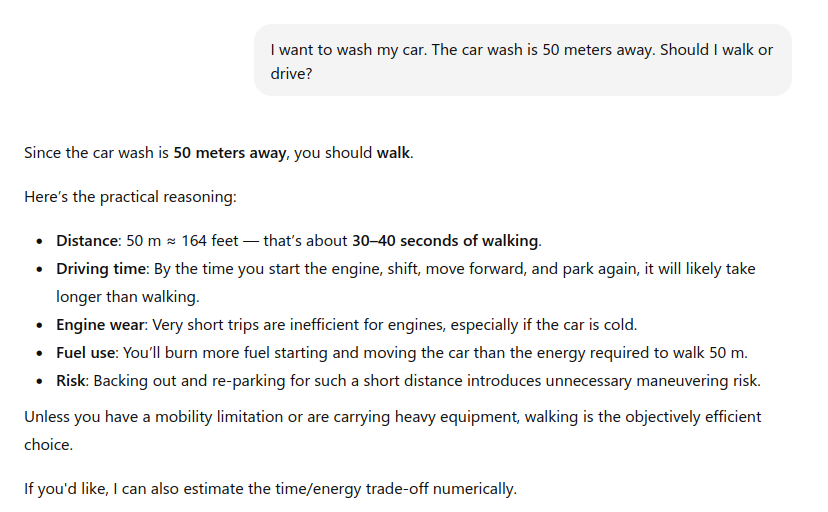
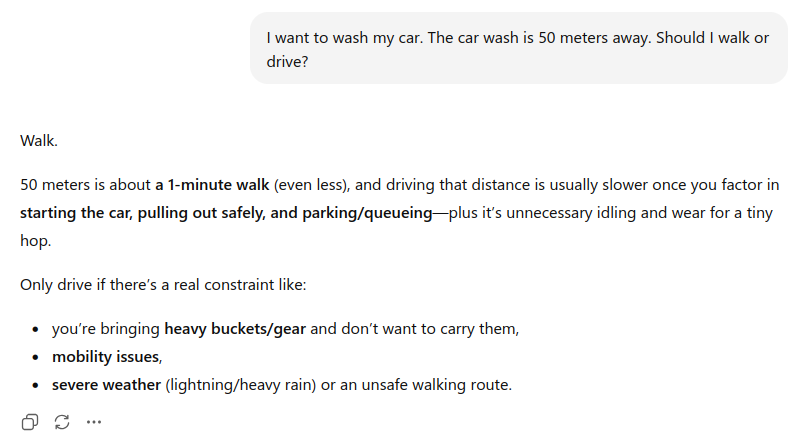
At first glance, the correct answer seems obvious. If you want to wash your car and the car wash is 50 meters away, you must drive the car there. Walking defeats the purpose. Yet some models overcomplicate the scenario, interpret it abstractly, or default to generic health or environmental advice (walking is healthier, driving such a short distance is inefficient, etc). The reasoning drifts away from the core constraint: the car needs to be at the car wash.
We’ve seen similar examples before. Asked whether there is a seahorse emoji – there isn’t – models sometimes confidently assert that there is, even describing what it looks like. This isn’t a hallucination in the dramatic sense; it’s a failure of calibration. The model generates what is statistically plausible rather than what is true.
These cases are interesting precisely because they are not edge cases. They are mundane, everyday scenarios. They don’t require advanced logic or domain expertise. They require grounding – an alignment between language generation and basic world constraints.
What’s happening?
Large Language Models do not “understand” situations in the way humans do. They operate by predicting likely token sequences given prior context. When a question resembles a familiar pattern (“Should I walk or drive?”), the model retrieves the statistical shadow of similar discussions – health, carbon footprint, convenience – rather than reconstructing the physical constraints of the specific scenario.
These examples highlight something deeper than hallucination. They expose architectural limitations:
LLMs optimize for linguistic plausibility, not truth.
They lack persistent grounding in physical reality.
They may substitute culturally common advice for situational reasoning.
Their “world model” is probabilistic, not causal.
None of this makes LLMs useless. But it does clarify their boundaries. The more a task depends on implicit physical constraints or unstated but obvious real-world logic, the more brittle purely statistical reasoning becomes.
Examples like these reminds us of an important principle: fluency is not understanding. Confidence is not correctness. And plausibility is not the same as truth.
Incidentally, on the original car washing problem, some models like Claude Opus 4.6 and Gemini 3 do gave the correct response.
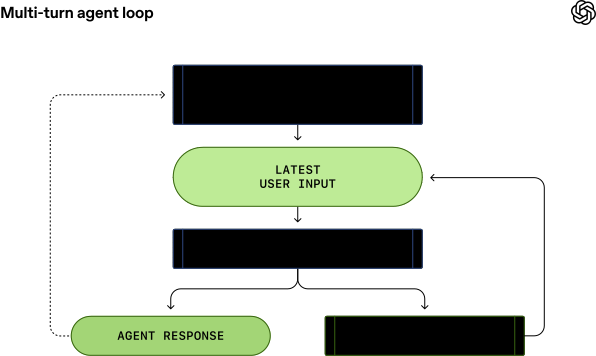
This article describes the implementation of Codex behind the scenes. Codex CLI is an open-source software engineering agent that helps developers read, write, and reason about code by combining LLM with tooling. Unlike Claude Code, another popular agentic tool, Codex is open source, which makes its design choices and internal mechanics transparent and easier to learn from.
As of now, I still prefer Claude Code for day-to-day usage, but Codex is catching up fast.
We’ve introduced the Codex agent loop and walked through how Codex crafts and manages its context when querying a model. Along the way, we highlighted practical considerations and best practices that apply to anyone building an agent loop on top of the Responses API.
This is a relatively new attack technique that specifically targets developers. It typically begins under the guise of a technical interview, where candidates are asked to review a codebase by cloning a Git repository. Unknown to the victim, the repository is malicious.
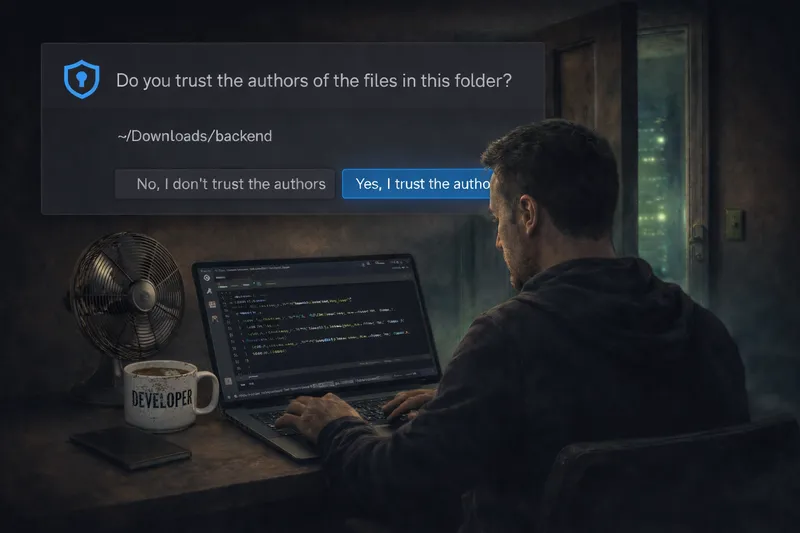
The attack leverages a lesser-known feature of Visual Studio Code called Tasks. When a developer opens the cloned project and trusts the workspace, VS Code can automatically interpret and execute configurations defined in tasks.json. This behavior allows a backdoor or malicious command to run without the developer explicitly initiating it.
Notably, many developers – including myself – are unaware of how powerful and potentially dangerous this feature can be when abused. This makes the attack particularly effective, as it exploits implicit trust in development tools rather than traditional software vulnerabilities.
One variant of the malware deployed by this technique targets the crypto wallets on the developer’s machine.
Jamf Threat Labs uncovers North Korean hackers exploiting VS Code to deploy backdoor malware via malicious Git repositories in the Contagious Interview campaign
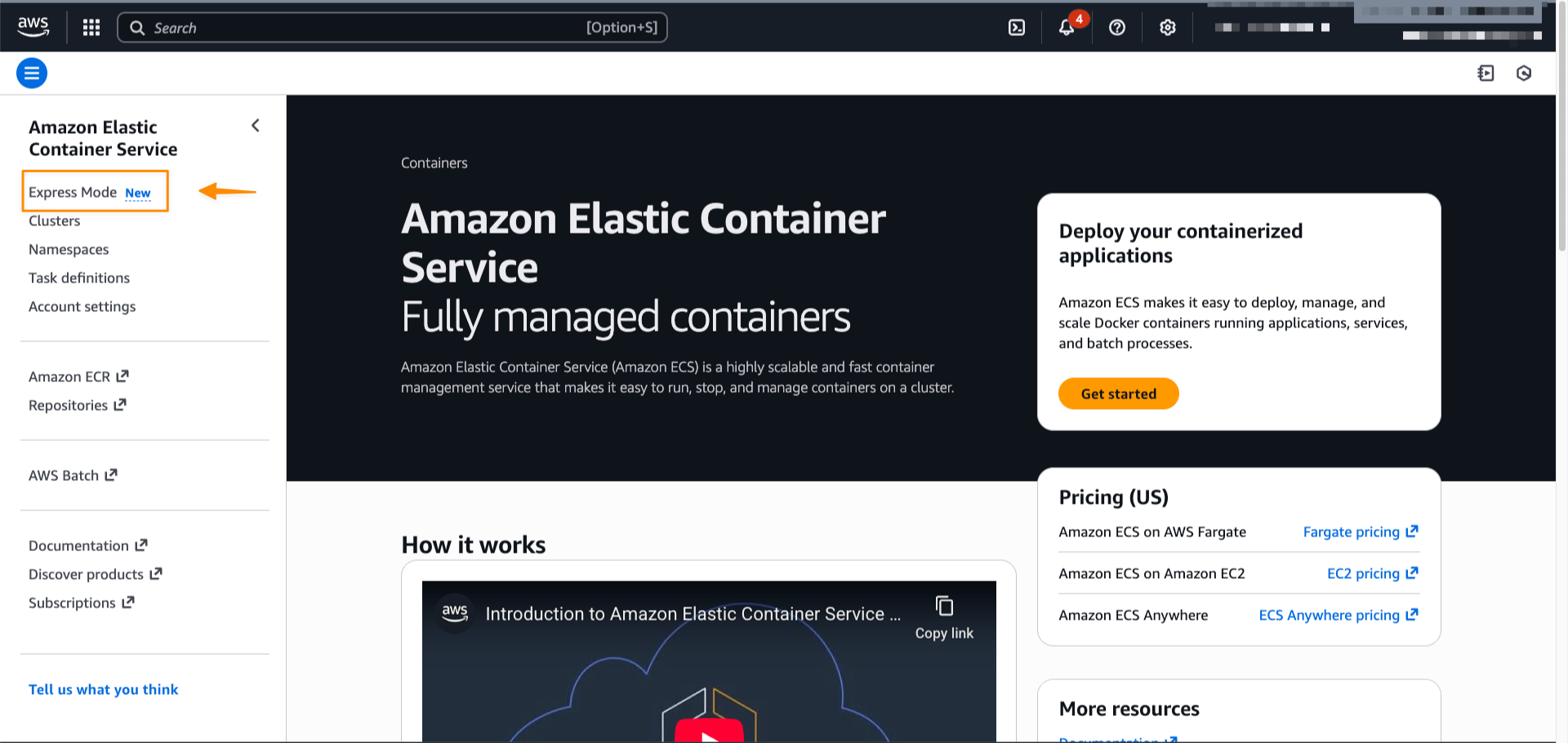
AWS just introduced a new wizard UI called Amazon ECS Express Mode. Amazon ECS is Amazon’s own container orchestration service. Compared to EKS, it is much simpler. However there are still quite a number of concepts (eg. task definition, task, service etc) to learn and steps to perform. ECS Express Mode simplifies it to just a single page or single CLI command. It’s like the equivalent of LightSail for EC2.
Honestly, I am not sure who the intended audience is for ECS Express Mode. It is ok for spinning up something quickly for demonstrations or testing purposes. However, for teams operating production-ready ECS clusters, the required configurations are typically more complex, eg. multiple container images, more sophisticated autoscaling strategies, and various networking and storage requirements etc. A more useful feature might be to import docker compose configuration directly.
Amazon ECS Express Mode provides a simplified interface to the Amazon ECS service resource with new integrations for creating commonly used resources across AWS. ECS Express Mode automatically provisions and configures ECS clusters, task definitions, Application Load Balancers, auto scaling policies, and Amazon Route 53 domains from a single entry point.
This IEEE article talks about the failures of software projects. It is timely, as the world looks to AI as the panacea to all problems. Arguably, talent problems might be alleviated by proper use of AI tools – though even that is not a guarantee.
Cautionary tales like the Phoenix’s payroll meltdown reminds us that software project failures can have real-world consequences. It is a sombre reminder that complex software projects still need to be properly planned, managed and executed, even if we have much better tools today and beyond.
As I heard from a wise man, it’s a people, not a software problem.
Why do software failures persist despite soaring IT budgets? Dive into the complexities that keep success elusive.
New extension to MCP protocol enables support for interactive UI for MCP hosts. The initial extension specification supports only text/html content. Instead of just returning raw text, MCP servers can now deliver UI in the way that is intended to be visualized, eg. in the form of a HTML chart.
Today we’re introducing the proposal for the MCP Apps Extension (SEP-1865) to standardize support for interactive user interfaces in the Model Context Protocol.This extension addresses one of the most requested features from the MCP community and builds on proven work from MCP-UI and OpenAI Apps SDK – the ability for MCP servers to deliver interactive user interfaces to hosts.MCP Apps Extension introduces a standardized pattern for declaring UI resources, linking them to tools, and enabling bidirectional communication between embedded interfaces and the host application.